
Clarity now requires a more precise way of handling cookie consent signals. Since October 31, 2025, Clarity has only offered full functionality for visitors from the EEA, UK, and Switzerland when a valid consent signal is passed for each visitor. ConsentV2 replaces the older API and provides more granular control: for both ad_storage and analytics_storage, you can indicate whether consent is granted or denied. In practice, this means that until you pass a ConsentV2 call, Clarity will operate in a “no-consent” mode (with limited tracking and no first-party/third-party cookies).
If you use the Complianz plugin on WordPress, you can enable this consent handling during the wizard setup when integrating Clarity. This ensures that Clarity’s tracking aligns with user consent and regional requirements.
Before You Start:
If you use the Clarity plugin, it will be configured automatically. If you prefer to add Clarity manually, read this article. If you want to set up Clarity with GTM or Google Analytics, or integrate it with an existing statistics setup already selected in Complianz, follow this article to add it manually so both can coexist.
To ensure Clarity does not set first-party and third-party cookies until you obtain consent, follow these steps:
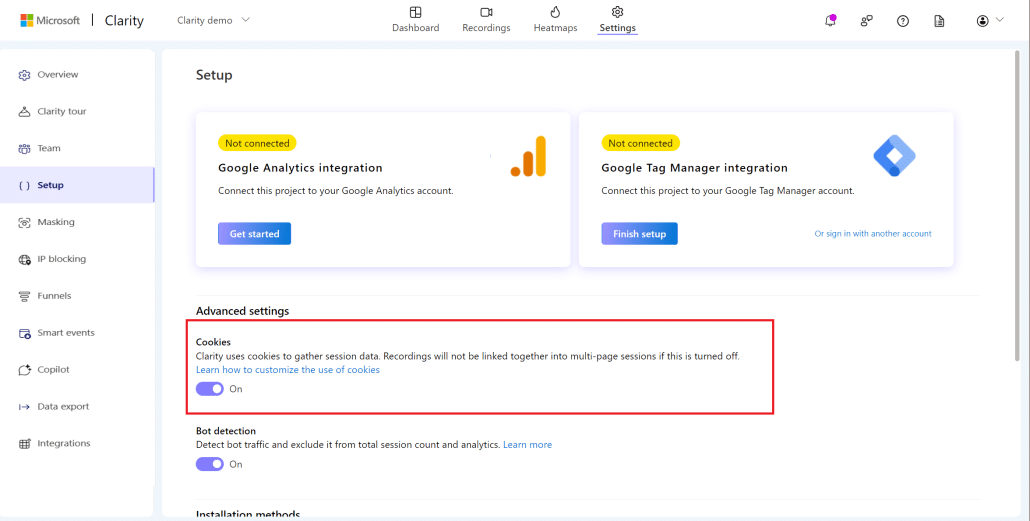
- Select the Clarity project.
- Go to Settings → Setup and Turn OFF to avoid setting cookies by default.
How to enable it in Complianz when adding Clarity in the wizard
-
Install and activate the Complianz plugin, then launch the setup wizard.
-
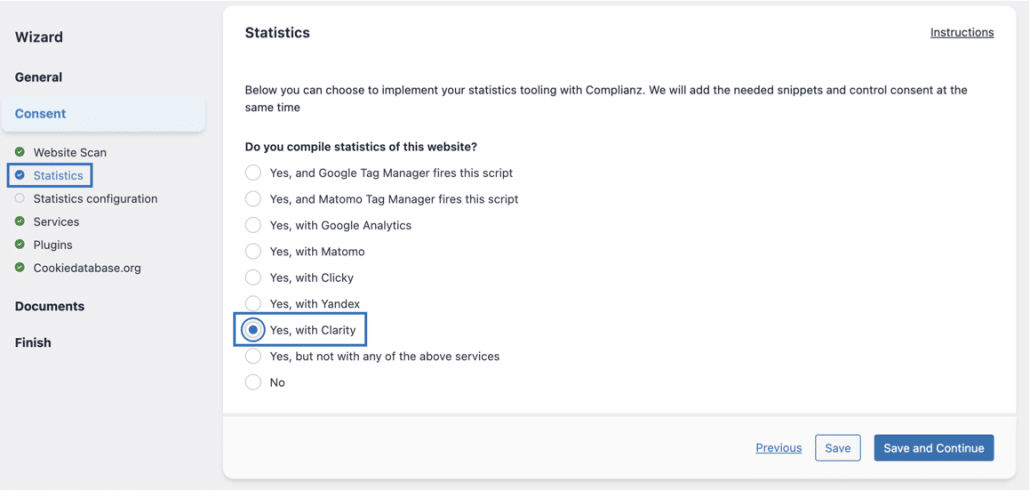
After ensuring you have completed the Before You Start steps, go to Wizard → Consent → Statistics in Complianz and select “Yes, with Clarity“. Click Save and Continue.
-
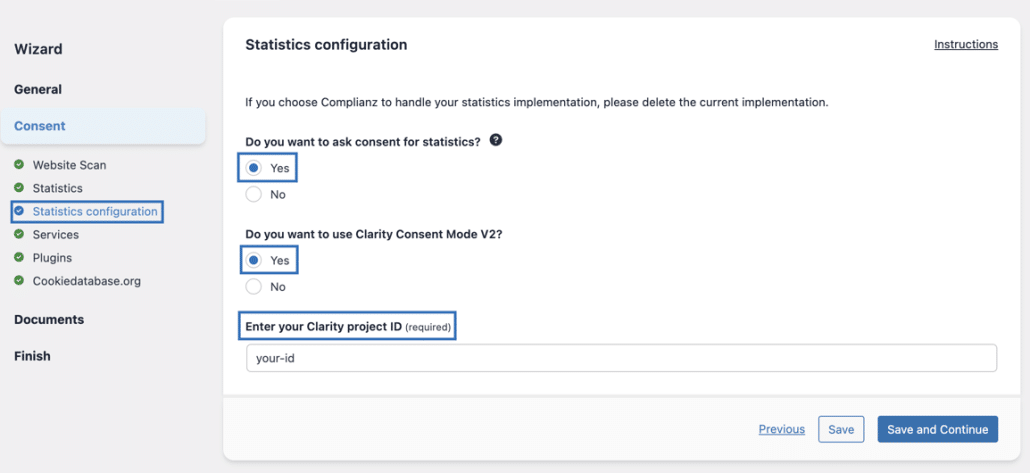
On the Statistics configuration page, enter your Clarity project ID and select “Yes” for the questions “Do you want to ask consent for statistics?” and “Do you want to use Clarity Consent Mode V2?”.
-
Save and complete the wizard. Complianz will then manage the banner, consent capture, and signal propagation to Clarity and will handle blocking scripts until consent is given (if configured).
What is Consent Mode V2 for Clarity?
What it does
The API call looks like:
window.clarity('consentv2', {

ad_Storage: "granted" | "denied",

analytics_Storage: "granted" | "denied"

});
If both ad_Storage and analytics_Storage are “granted”, Clarity can set its cookies (_clck & _clsk) and track users across pages and sessions.
In our setup, ad_Storage is controlled by the Marketing category, and analytics_Storage is controlled by the Statistics category.
If either is “denied”, Clarity switches to a no-consent mode: it does not set persistent user cookies and treats each pageview as a new user.
Important: this is required (for Clarity features to function fully) for visitors from EEA, UK, Switzerland starting 31 October 2025, therefore, the previous method
window.clarity('consent', true/false)is deprecated; ConsentV2 is the recommended method.
Why it matters
-
Compliance: Ensures Clarity respects cookie consent for analytics and marketing where required by law.
-
Data quality: Proper signalling avoids broken session stitching or unexpected “all new users” in reports.
-
Implementation: Provides a clean, standard way to handle consent in line with Microsoft’s and EU/UK/CH requirements.
Debugging Clarity Consent Mode
Add the below code in your browser console and check to see if all consent states change correctly:
clarity('metadata', (d, upgrade, consent) => {

       console.log('consentStatus:', consent);

  }, false, true, true);
Clarity uses two main cookies:
-
_clck– a persistent cookie that stores an anonymous user ID and preferences for that site. It’s the key used to recognize the same visitor across multiple page views and sessions. -
_clsk– a session cookie that groups events for the current visit. It is not meant to persist user identity across sessions.
With ConsentV2 and Complianz:
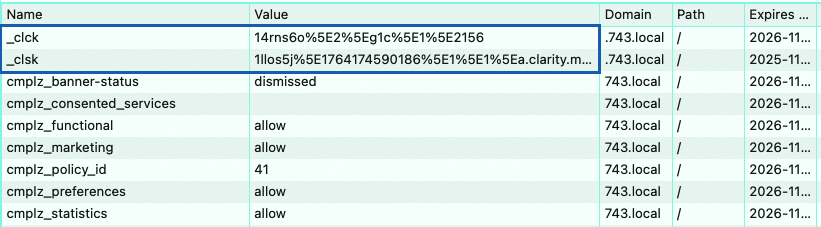
In full-consent mode (ad_Storage: "granted", analytics_Storage: "granted"):
-
_clckis set and keeps the same value as the visitor navigates your site or returns later. -
_clskis used per session as usual. -
Clarity can reliably stitch sessions and recognize returning visitors.

In no-consent mode (both values "denied"):
-
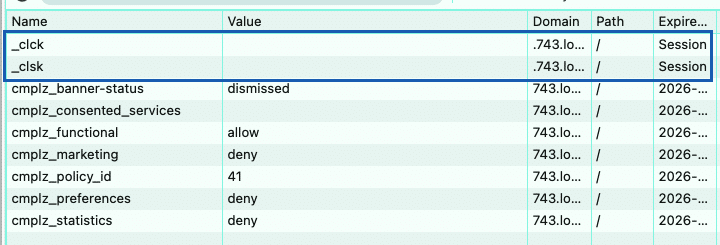
_clckis not set or shows an empty value, depending on whether the visitor refuses the banner the first time or later revises their consent choices. -
_clskis not set or shows an empty value, depending on whether the visitor refuses the banner the first time or later revises their consent choices. -
Each pageview can show up as a “new user” in Clarity reporting, which is expected in this mode.
 Example of consent being revised by the visitor
What Happens for Common Consent Combinations
The following examples reflect what your visitors choose in the Complianz banner and how this maps to Clarity.
1. No choice yet (initial visit)
Before the banner is accepted or denied, Complianz initializes Clarity with safe defaults:
ad_Storage:        'denied'

analytics_Storage: 'denied'
Clarity runs in an effective no-consent mode:
-
_clckand_clskare not set, -
no persistent user identification,
-
only limited page-level data where required.
2. All consent refused
If a visitor refuses both statistics and marketing:
ad_Storage:        'denied'

analytics_Storage: 'denied'
Expected behaviour:
-
_clckand_clskare not set, -
each pageview is treated as a “new user” in Clarity, and even though cookies aren’t placed, Clarity still communicates via the ongoing script in a compliant, cookieless way.
This behaviour is compliant and intended.
3. Marketing denied, Statistics granted
A frequent real-world case is:
ad_Storage:        'denied'

analytics_Storage: 'granted'
This corresponds to Marketing = denied, Statistics = granted in the banner.
With ConsentV2, this means that Clarity is allowed to use its analytics cookies (for example, _clck and _clsk) but is not allowed to use the data for advertising or remarketing purposes.
In practice:
-
Clarity cookies are set and used to keep sessions together,
-
the visitor can still appear as the same user across pages and sessions,
-
the data is not used for advertising because ad_Storage is denied.
4. Marketing and Statistics both granted
When a visitor accepts both categories:
ad_Storage:        'granted'

analytics_Storage: 'granted'
This is full consent:
-
_clckis created and remains stable across pageviews and return visits (until removed or expired), -
_clskhandles the current session, -
Clarity can track returning visitors and build coherent sessions.
If _clck keeps changing in this scenario, it usually indicates that Clarity is not receiving the correct ConsentV2 signal or another script is clearing cookies too aggressively.