
Note:
Showing different banners for different regions is a Complianz Premium feature. With the free plugin, you pick one legislation as your default and show that banner to every visitor worldwide. If you want to apply a region-based approach, you’ll need the Premium version.
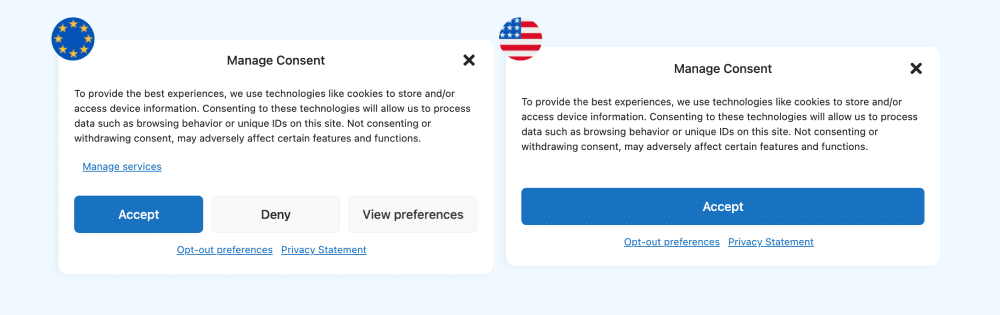
Not every visitor on your site lives under the same privacy law. Your visitor in Berlin needs to opt in to cookies before tracking starts. Your visitor in California needs an easy way to opt out of the sale or sharing of their personal information. Showing all the same banner means either over-asking the people who don’t need it or under-asking the people who do.
Geolocation solves that. When activated, Complianz by iubenda determines the visitor location and displays the proper consent flow for their region. Same plugin, same site, different banner for different users. Here’s how it works.
What does the Complianz geolocation feature do?
Geolocation (GEO IP) is the practical answer to a basic compliance problem: privacy laws are regional, but your traffic isn’t.
When a visitor opens a page on your site, Complianz checks their location and matches it to the regions you’ve activated in the plugin. Based on that match, it picks the right cookie banner, the right policy text, and the right consent behavior for that visitor.
The visitor doesn’t see anything called “geolocation”. They just see a banner that’s appropriate for their location. The work happens before the page renders.
How Complianz detects visitor location
The plugin uses two pieces of information.
The first is the visitor’s IP address. Every device that connects to your site sends one, and each IP range belongs to a specific country or region. Reading the IP gets us most of the way there.
The second is a country lookup database. Complianz uses an industry-standard IP database that maps IP ranges to country codes. The plugin checks the visitor’s IP against the database and gets back a country, which it then matches against the regions you’ve enabled.
Two things to know about how this gets handled:
- The database lives on your site, not on a third-party server. The lookup happens locally, so visitor data doesn’t leave your environment.
- The database refreshes as IP allocations change. New ranges, reassigned blocks, and corrections all flow in over time, so the matching stays accurate.
If your site sits behind a CDN or proxy (Cloudflare, for example), the plugin reads the original visitor IP from the forwarded header so the lookup still works.
Show a different cookie banner for each region
Once geolocation is enabled, you can run different consent flows for different regions without splitting your site, building separate landing pages, or asking visitors to declare where they’re from.

A few examples:
🇪🇺 🇬🇧 EU and UK visitors get opt-in. The General Data Protection Regulation (GDPR) and the ePrivacy Directive (“cookie law”) require informed, prior consent before any non-essential cookies fire. Complianz shows European visitors a banner that blocks cookies until they choose, and your tracking only loads after they accept.
🇺🇸 US visitors get opt-out. State laws like the California Consumer Privacy Act (CCPA) work the other way around. Cookies can run by default, but users need a clear way to say “stop selling or sharing my data”. Complianz serves US visitors a notice with the right opt-out preferences link, including a “Do Not Sell or Share My Personal Information” option where it applies.
🇧🇷 Brazilian visitors get an LGPD-aligned flow. The Lei Geral de Proteção de Dados (LGPD) takes a similar shape to the GDPR, but the consent text, legal basis, and data-subject rights references need to match Brazilian requirements. Complianz handles those for visitors in Brazil.
You can enable any combination of these. A site that only sells in Europe and the US doesn’t need to set up LGPD. A global SaaS company can turn all of them on and let geolocation do the routing.
Region-specific privacy and cookie policies
The same logic extends to your legal documents.
When you activate multiple regions in Complianz, the plugin generates a separate Cookie Policy and Privacy Statement for each one. The banner each visitor sees links to the policy for their region, so your French visitor opens the GDPR version while your US visitor opens the US version.
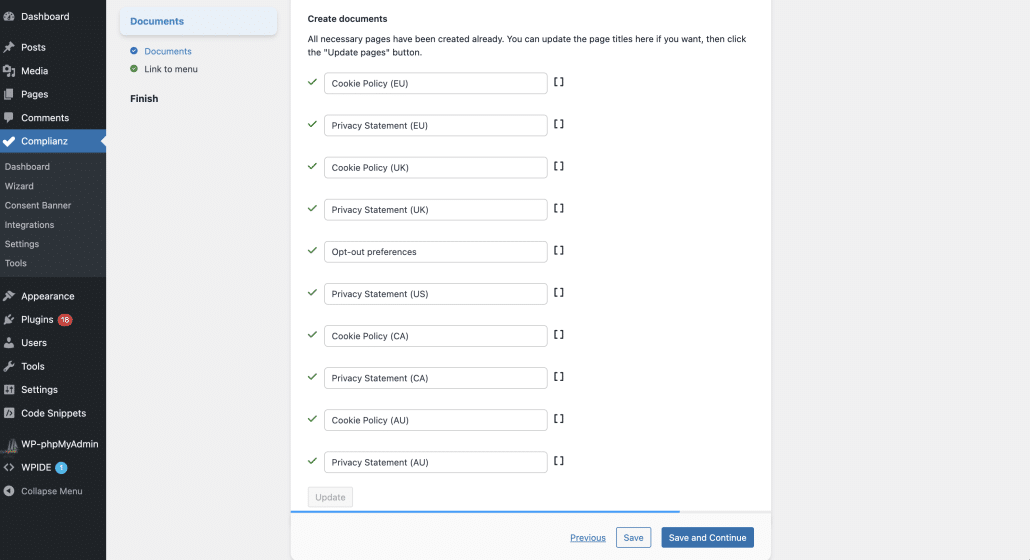
You can also set your existing policy URLs to auto-redirect based on visitor region. Add ?cmplz_region_redirect=true to a policy link in your footer or menu, and Complianz forwards each visitor to the right document.
For more details see our dedicated article on how to redirect your policies based on region.
The same applies to consent revocation, opt-out forms, and any compliance affordance tied to a specific region. The visitor’s location decides what they see.
How to enable GEO IP in Complianz
Geolocation is built into Complianz. Simply enable it from the plugin settings.
Start with the wizard. If you haven’t configured Complianz yet, run it from your WordPress admin. The wizard walks you through activating the regions you want to support (Europe, UK, US, Brazil, Switzerland, etc.) and generating the matching banners and documents for each one.
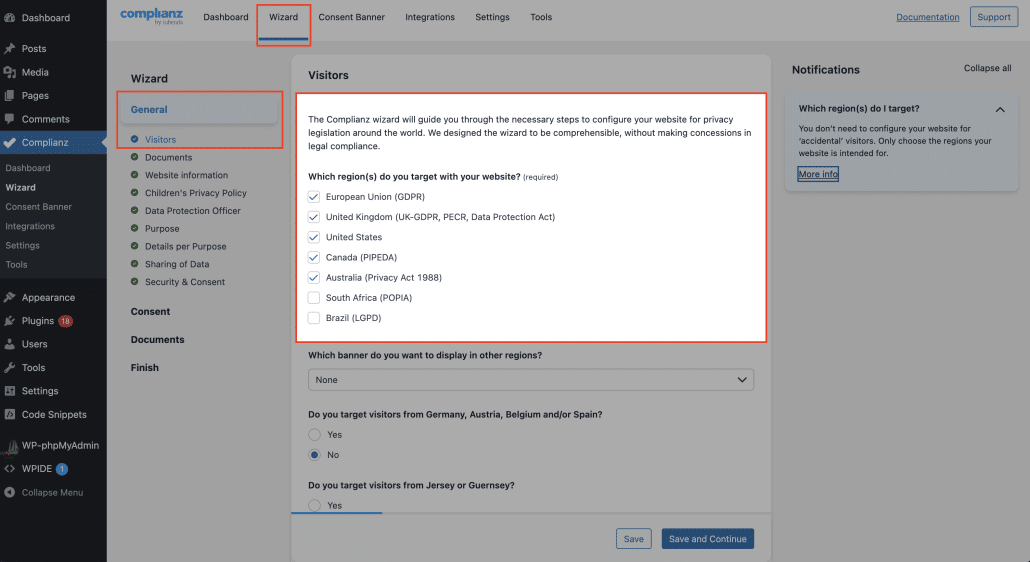
💡 Please note, with Complianz Free, you pick one as your default for all worldwide visitors. With Premium, you can enable several at once and let Geo IP route between them.
👉 Already configured? You can re-run the wizard any time to add a region.
Once the wizard is done, turn geolocation on:
- Open Complianz in your WordPress admin.
- Go to Settings → General and enable GEO IP.
- Save.
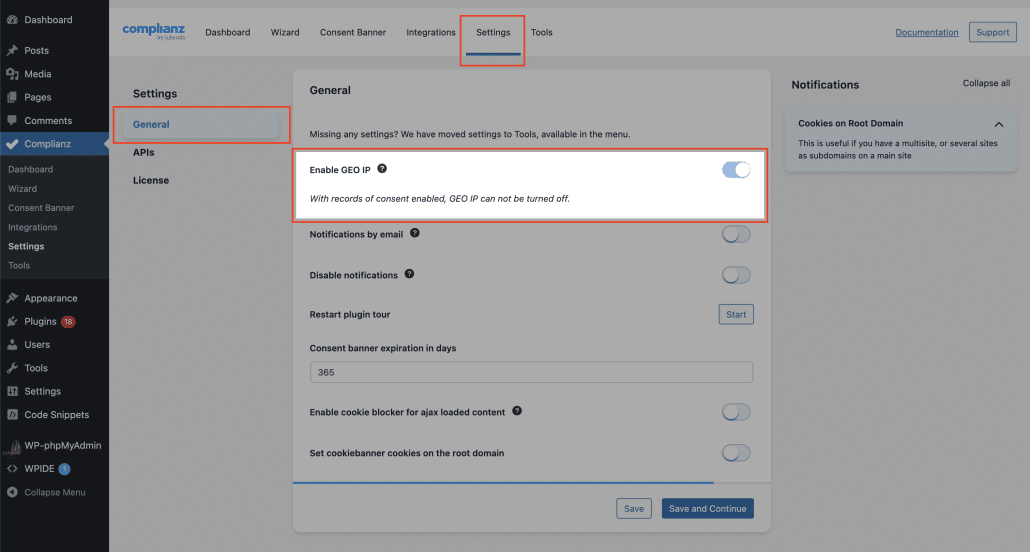
The plugin downloads the country lookup database automatically the first time you enable geolocation, and refreshes it as updates roll out. If your hosting environment blocks the automatic download, you can upload the database manually.
Need to go deeper?
For the technical side of running geolocation on your specific setup, we have separate guides:
- Overriding the GEO IP header when your site sits behind a proxy like Cloudflare.
- Checking if the GeoIP database is readable when Geo IP isn’t picking up locations.
- Manually adding the GeoIP database when automatic download fails.
- Redirecting your policies based on region to send each visitor to the right document.
Get started with Complianz
If you’re already running Complianz, head to your plugin settings and enable Geo IP. To serve different banners by region, you’ll want Complianz Premium, which lets you enable multiple legislations and switches between them based on visitor location.
New to Complianz?
Get the free plugin from WordPress and have a banner aligned with your default legislation up in minutes.