
Upgrading your license
Want to upgrade your existing subscription? Great! Enjoy more features or higher capacity to match your business growth.
💡 If you’re currently on the Free license and want to upgrade to Premium, follow this guide.
💡 Any subscription can be upgraded into any other subscription.
To upgrade, follow the steps below:
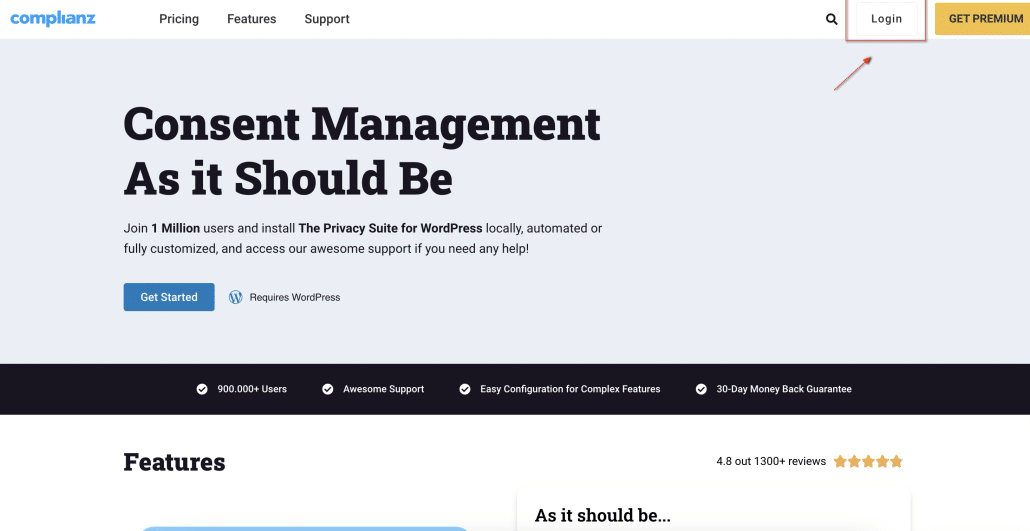
- Go to the homepage at Complianz.io;
- If you’re not logged in yet, click on “Login” (top right corner). Enter your credentials and access your account;
- If you’re logged in, click on “Account” (top right corner);
- Once in your account area, you should see a “Licenses” section;
- Click on “View Upgrades” in the gray box;
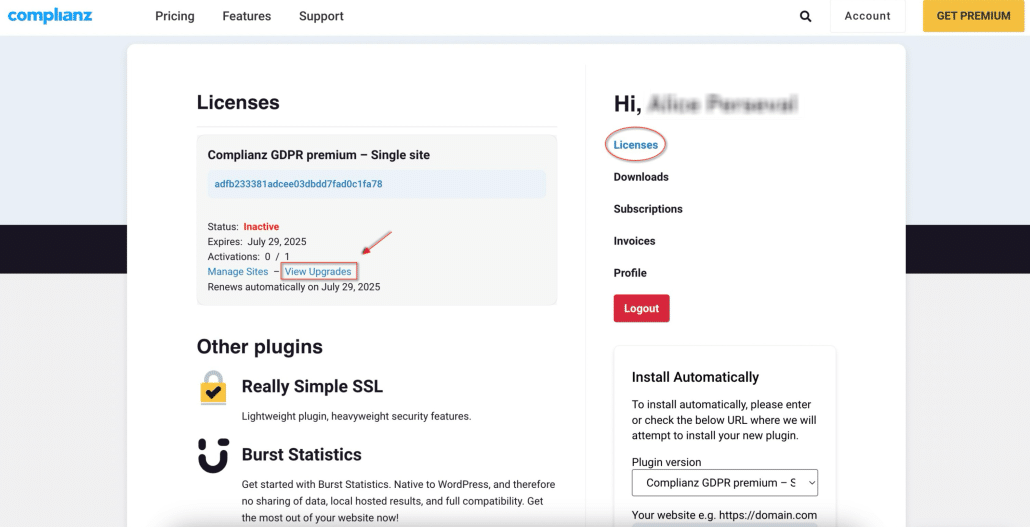
- You’ve reached the upgrade menu! All the prices you see are yearly;
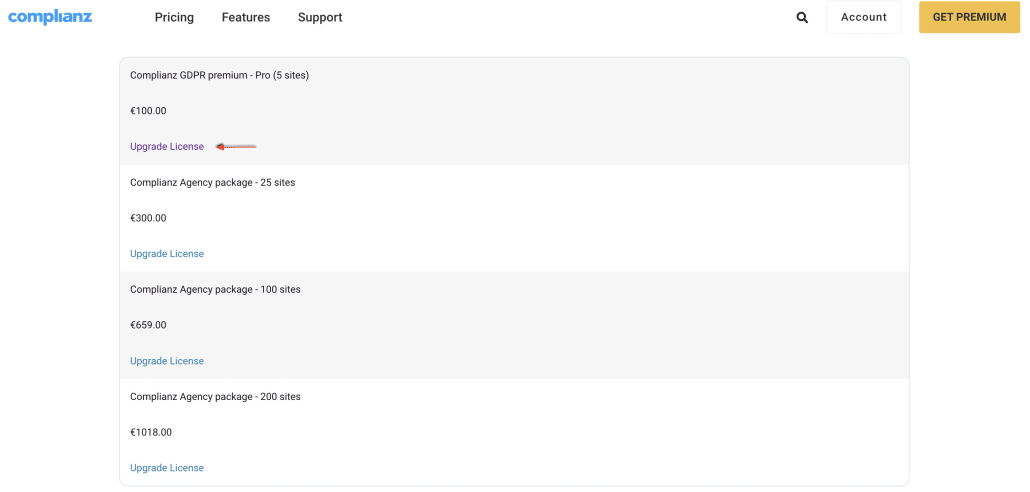
- Click on “Upgrade License” for the package of your choice. You will be redirected to the checkout page for secure payment.
You’re done! You should receive a confirmation email. The upgrade will be effective right away.
💡 Good to know
Let’s say you sign up for subscription A, and after a month, want to upgrade to subscription B. You will not be charged for a full year of subscription B. We will recalculate the amount due. For that specific year, you will be charged for 1 month of subscription A and 11 months of subscription B. The yearly end date of your subscription will remain the same.
Merging existing subscriptions
Have two or more existing subscriptions that you’d like to put together? It’s possible!
Combining subscriptions isn’t automated and will have to be done manually by our team. The process is the following:
- Reach out to Customer Support to specify which subscriptions need to be combined;
- We calculate the credit remaining for these subscriptions and create a discount code of the same value;
- We send you this code and you use it to purchase a new single subscription;
- With this new subscription, you’ll get a new license key which has to replace the original license key as the related subscriptions will soon be deleted;
- Once done, inform us and we’ll delete the subscriptions that have now been combined.
We kindly ask you to reach out to Customer Support so we can do this for you. Please send your request here at https://complianz.io/support/, scrolling down to the ticket form.
Moving your license key to a new domain or environment
Changed your website, domain, or WordPress environment and want to use your existing license key there instead? In most cases this is simple, and you won’t need an extra license slot.
💡 If you’re staying on the same WordPress environment (for example you only changed your domain or site URL), nothing changes on the licensing side. You likely just need to update your website details inside the Complianz Wizard.
💡 If the new website or environment is a separate WordPress install from your existing one, and you have no more license slots available, deactivate the license key on the old setup and activate the same key on the new environment. A single-slot license can be moved this way as long as it’s only active on one site at a time.
If you’d like to carry over your existing plugin settings to the new environment, you can export them via Tools → Data → Export and import them on the new site.
👋 Are you on a Free Complianz license?
Improve your compliance journey now. Check out our comparison table to find out what you get when switching to Premium!