
Privacy laws in the United States and Canada differ from the European Union’s GDPR framework. This article provides an overview of consent requirements and privacy regulations applicable to users in the US and Canada, helping you understand the nuances and the compliance steps to take when using Complianz.
Note: US and Canadian laws generally do not directly address cookies and trackers. General requirements on data processing activities, however, also apply to those carried out through tracking technologies.
Table of Contents
US Privacy Laws Overview
Unlike GDPR’s strict opt-in requirement for cookie consent, most US privacy laws (such as the California Consumer Privacy Act, CCPA, as amended and updated by California Privacy Rights Act, CPRA) are based on an opt-out model. This means data can be collected by default unless users explicitly choose to opt out.
Because of this, Complianz uses opt-out for US visitors by default. If you prefer an opt-in experience, you no longer need to build a custom banner: the wizard can switch the whole US region to opt-in for you. See Switching the US Region to Opt-In below.
A custom banner is still an option if you need something the wizard cannot produce, but you will lose the automated legal updates and configurations that Complianz offers, and you will be responsible for the implementation and its compliance yourself. For guidance, see our detailed Create Your Own Banner From Scratch documentation.
US Privacy Laws Are Fragmented and Sector-Specific 👇
Unlike the EU’s unified GDPR, privacy laws in the US vary by state and industry. Besides California’s CCPA/CPRA, more and more states, Virginia and Colorado, among many others, have their own privacy laws. Many regulations focus on specific sectors, for example, HIPAA covers health data. Because of this patchwork, consent requirements can differ depending on where your users are and what industry you operate in. Businesses should keep a close eye on state-specific rules and update their cookie banners and data practices as needed.
No Federal Cookie Consent Law in the US👇
Currently, there is no federal law requiring cookie consent banners like the GDPR. The Federal Trade Commission (FTC) enforces general privacy standards but hasn’t set specific rules for cookie consent. That’s why many US websites use opt-out models or don’t show cookie banners at all, instead relying on clear privacy policies and opt-out options for data sales and sharing.
Switching the US Region to Opt-In
We have seen a steady increase in requests for an opt-in banner in the US, and for California in particular. Complianz now supports this directly: a question in the wizard switches the entire US region from opt-out to opt-in.
Opt-in is a preference, not a legal requirement
Opt-out is legally sufficient in the US, including in California under the CCPA and CPRA. Opt-in is not required. This option exists for site owners who prefer an opt-in banner, often because of concerns related to the California Invasion of Privacy Act (CIPA).
How to Enable It
The question appears in the wizard only when you target the US region and select California:
The US region uses opt-out by default. Since you’re targeting visitors from California, would you like to switch the entire US region to opt-in instead?
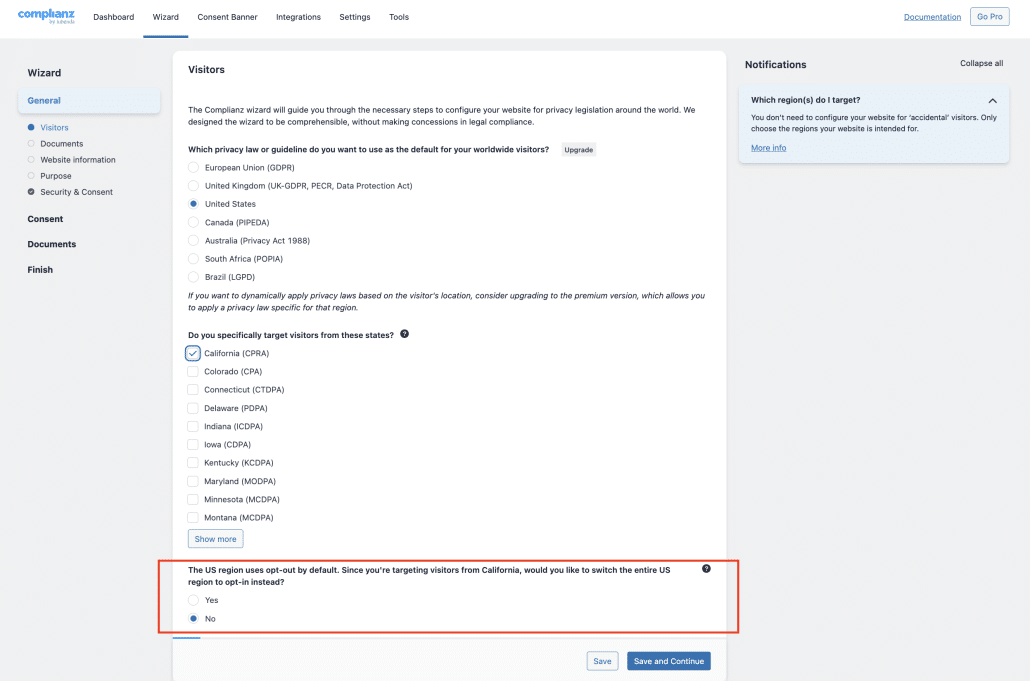
Answer Yes and three things change:
- Statistics and marketing scripts are blocked until a US visitor actively consents
- Your US legal documents update to match, with opt-in consent wording and a “Manage your consent settings” option
- The CCPA and do-not-sell-or-share sections stay in place, because California visitors keep those rights either way
The default stays opt-out. Nothing changes unless you answer Yes.
It Applies to the Whole US, Not Only California
Geolocation in Complianz works at country level, not state level. It is not possible to show an opt-in banner to visitors from California and an opt-out banner to visitors from other states. When you switch to opt-in, every US visitor sees the opt-in banner.
This is the same mechanism already used for Canada and Quebec, where the choice also applies to the whole country rather than to one province.
If Your Site Already Has a US Page
On a site that already generated the US document, switching to opt-in changes the consent behavior and the content of the document, but it does not rename the existing page. Complianz keeps the original title and slug on purpose, so your existing links and menu items do not break.
New pages are created with the title “Cookie Policy (US)” instead of “Opt-out preferences”. To pick up the new title on an existing site, recreate the page. New installations get the correct title from the start.
Canada Privacy Laws Overview
Canada’s privacy landscape includes the federal Personal Information Protection and Electronic Documents Act (PIPEDA) and Quebec’s Law 25, which impose consent requirements for data collection.
Complianz applies geolocation at country level, so a single banner cannot currently serve Quebec and the rest of Canada differently. Complianz offers two options:
- An opt-out consent model for the rest of Canada under PIPEDA
- An opt-in model specifically for Quebec under Law 25, where CAI, Quebec’s Commission for Access to Information, takes the express-consent line
Opt-out does not cover everything. Under guidance from the Office of the Privacy Commissioner of Canada it is not an appropriate basis for fingerprinting, zombie or supercookies, third-party cookies presented as first-party, sensitive categories of data, or tracking that involves children. Those need express consent.
Law 25 in Quebec introduces strong consent requirements, emphasizing meaningful consent and greater transparency. The Law, together with CAI’s guidelines, is bringing Quebec’s standards closer to those of the GDPR. Businesses serving Canadian users should tailor their consent processes to account for these provincial rules.
The Quebec position is not fully settled. Section 9.1, on privacy by default, explicitly carves out browser cookies, so the opt-in reading rests on section 8.1 together with CAI guidance rather than on a single explicit provision.
Canadian federal privacy law may also change. Bill C-36, the Protecting Privacy and Consumer Data Act, had first reading on 15 June 2026 and would replace PIPEDA. It is not law, and nothing on this page changes until it is.
Is it Possible to Include a “Deny” Button in a U.S. Banner?
By default, US banners follow the opt-out model, so they do not include an explicit “Deny” button. Data collection is generally permitted unless a visitor takes action to opt out, and US regulations do not require prior consent for most types of data processing the way the GDPR does.
If you want US visitors to be able to refuse before anything is set, switch the US region to opt-in in the wizard. The banner then asks for consent first, which gives visitors a real choice to decline. See Switching the US Region to Opt-In above.
Opt-out remains aligned with existing US legal standards and does not require a dedicated “Deny” or “Revoke” button. This setup keeps your site aligned with US privacy requirements by default.
Comparison Table: GDPR vs US vs Canada Cookie Consent
| Feature | GDPR (EU) | US (CCPA/CPRA) | Canada (PIPEDA) | Canada Quebec (Law 25) |
|---|---|---|---|---|
| Consent Model | Opt-in | Opt-out | Opt-out (implied consent acceptable for non-sensitive tracking, express consent for sensitive data) | Opt-in (express, per purpose, non-essential trackers off by default) |
| Prior blocking applies to tracking technologies employed for certain purposes | No | No | No | Not explicit in law, but recommended |
| Reject Button Required | Yes | Not legally required | Not legally required | Not expressly required |
| Geolocation-Based Settings | Per EU country | United States (country level, not per state) | Canada | Quebec |
| Default Complianz Behavior | Opt-in banner | Opt-out, with an optional opt-in for the whole US region | Opt-in | Opt-out |
Important: Geolocation Limitations and Practical Considerations
Geolocation works at country level. Because of that, and because different rules apply in Canada and Quebec, Complianz can’t offer separate opt-in and opt-out options for these regions within a single banner. The same applies to the United States: it is not possible to apply opt-in to California alone, so the opt-in option covers every US visitor. To meet all requirements, businesses might consider a global opt-in approach or create a custom banner tailored to their specific needs.
Practical Tips for Implementing Cookie Consent in the US and Canada
- Use Clear Language: Regardless of opt-in or opt-out, clearly describe what cookies are used, their purpose, and users’ rights.
- Offer Easy Opt-Outs: Even if not legally required, providing a reject or opt-out button enhances user trust and aligns with privacy best practices.
- Regularly Review Privacy Laws: US and Canadian privacy regulations are evolving rapidly, so periodic legal review keeps your compliance current.
- Segment Audiences: Use geolocation or user selection to show appropriate cookie consent mechanisms to US, Canadian, and Quebec visitors.
- Document Consent and Opt-Outs: Keep logs to demonstrate compliance if audits or legal inquiries occur.
This information is provided for general guidance and does not constitute legal advice. Always consult with legal experts and official resources to ensure compliance.