
Some store owners want visitors to choose how their data is used before they can interact with the website. The Complianz plugin for Shopify includes a feature that blocks all interaction with the page until the visitor makes a choice on the cookie banner. This guide explains how the feature works and how to enable it.
What Background Overlay Does
When the background overlay is active, the plugin places a semi-transparent layer over the website. This layer blocks any clicking, scrolling, tapping, or opening of elements. The cookie banner remains fully usable, and it becomes the only part of the page visitors can interact with.
After a visitor makes a choice on the banner, the overlay disappears and the website becomes fully accessible.
The feature works through the banner.backgroundOverlay setting. When set to true, the plugin creates this blocking layer automatically.
How to Enable the Overlay in the Plugin
Follow these steps to activate the overlay through the Complianz plugin for Shopify dashboard.
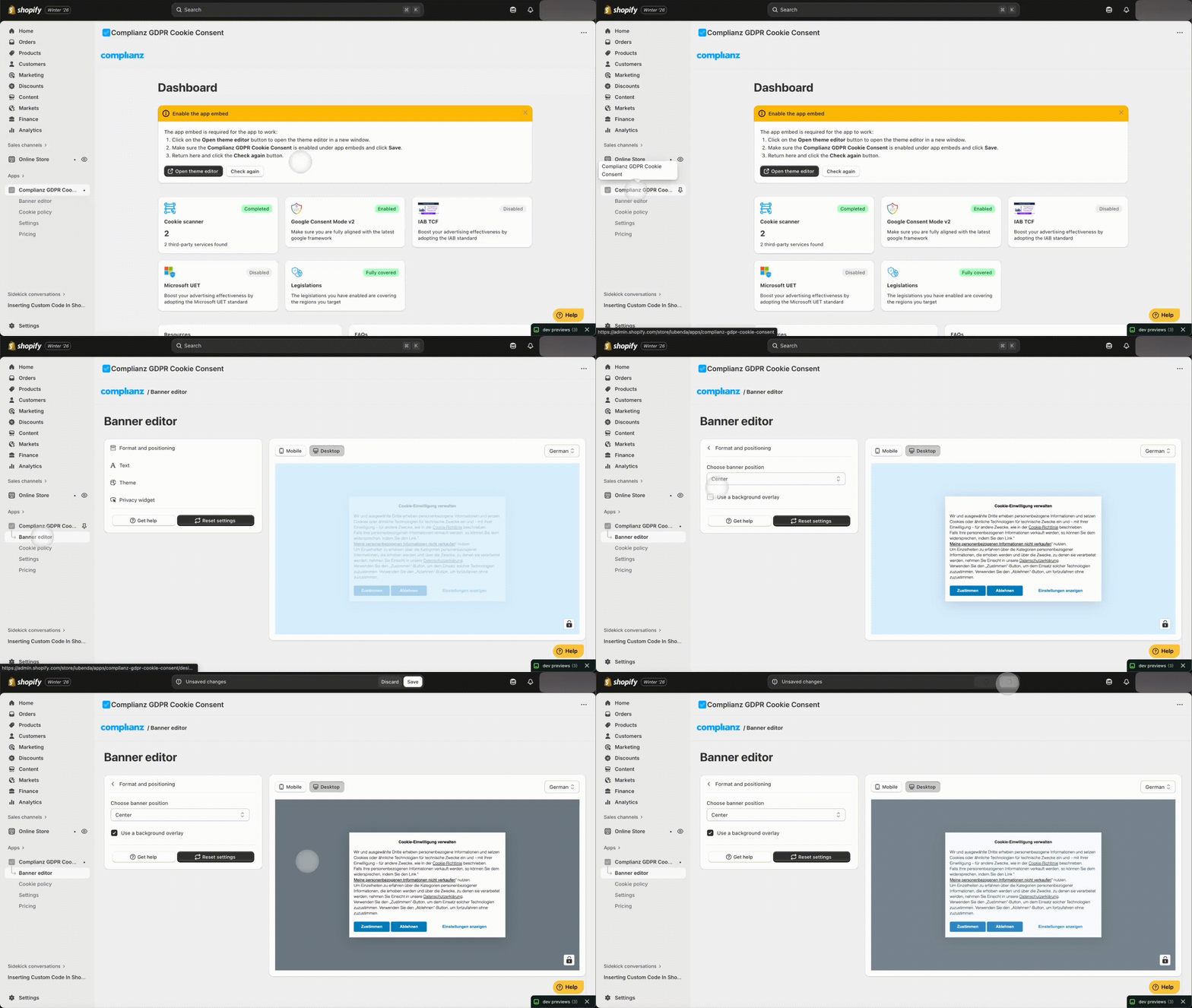
- In your Shopify admin, open Apps and select Complianz GDPR Cookie Consent.
- Choose Banner editor from the left menu. This area manages how your cookie banner looks and behaves.
- Open Format and Positioning.
- Turn on Use Background Overlay. This sets banner.backgroundOverlay to true.
- Save your changes. The cookie banner will now appear with an overlay that prevents interaction with the site until the visitor makes a choice.
What Visitors Will Experience
With the overlay enabled:
- The page behind the banner cannot be clicked or scrolled
- The banner becomes the only active element
- Once a choice is made, the overlay is removed and the site works normally
This ensures visitors clearly make a consent decision before using the website.
The background overlay feature offers a straightforward way to control when visitors gain access to your website. By enabling “Use Background Overlay” in the Banner editor, you ensure the site remains inaccessible until a visitor makes a consent choice on the cookie banner. This supports compliance and offers visitors a clear way to confirm their preferences.